Turn traffic into your biggest directory asset
The analytics platform built for directory websites.
DirectoryLens organizes Google Search Console, Google Analytics and Bing the way your directory is built: listing pages, cities, categories and states. Find the pages to build next, catch indexing and ranking problems early, and show every paying business what their listing earns.
Read-only access to your data · Keeps your history past Google's 16 months · Cancel any time
Google may show a "Google hasn't verified this app" screen while our Google review finishes. It's safe and read-only: here's what it means and how to continue.
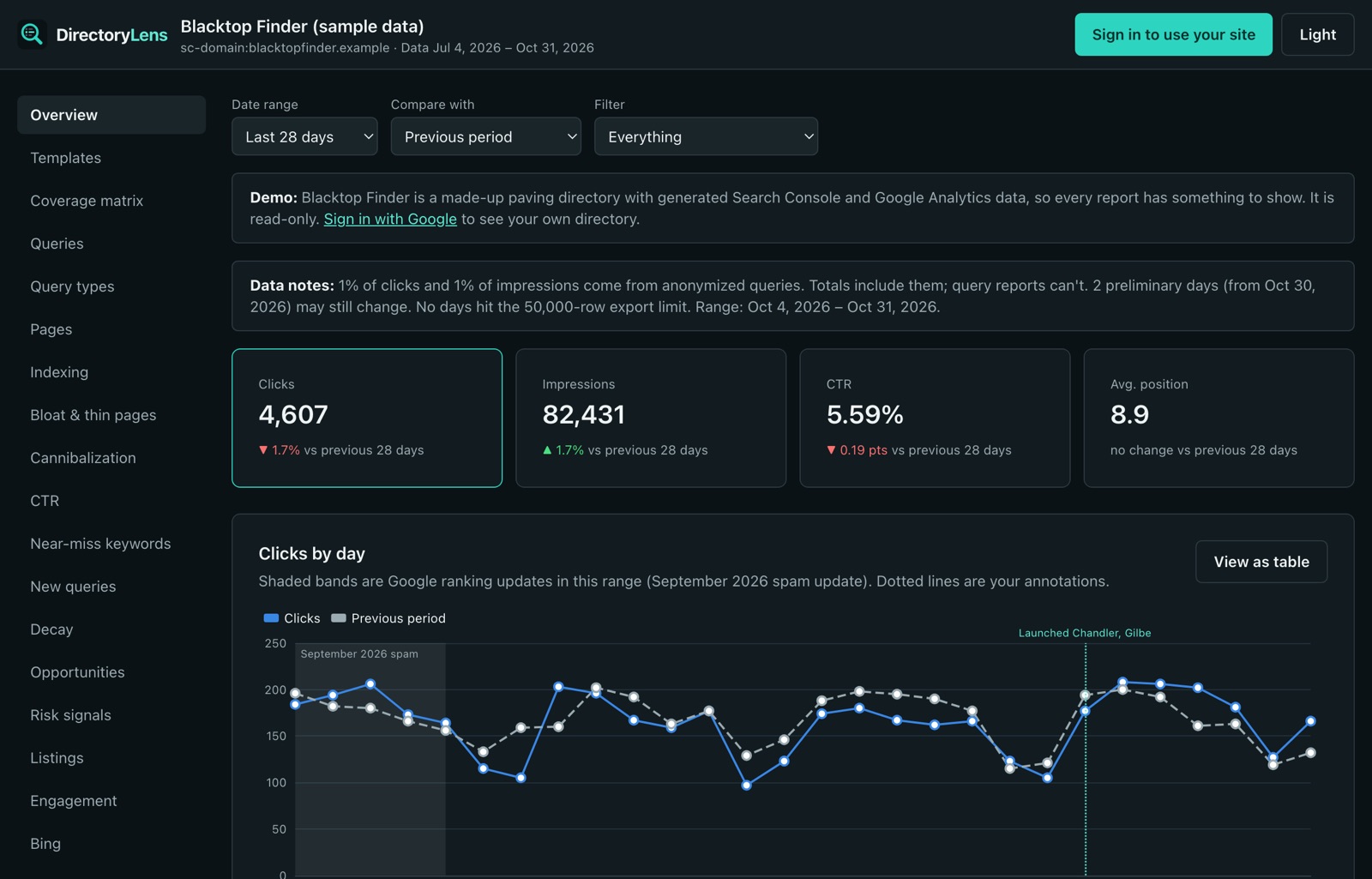
General SEO tools see 20,000 URLs. You run a directory.
A directory wins or loses by template, by place and by category, and it gets paid by listings. When all of that is buried in one long list of URLs, the problems that cost you traffic and renewals stay invisible.
The slow leak
Your city pages lose 20% of their clicks.
Spread across hundreds of URLs, the drop never stands out. DirectoryLens reports it as one line per template, with the day it started.
The missing page
People search "sealcoating in Austin" and you have no page.
The coverage matrix maps real searches to categories and cities, so demand without a page becomes a build list.
The renewal question
A paying business asks what their listing did.
They already have the answer: a monthly email with their searches, visits, calls and website clicks, under your name.
Grow traffic
Know which page to build or fix next.
Every page type in one row: how many pages Google shows, how many it ignores, the share indexed and which templates gain or lose clicks. Then go one level down to the searches behind it.
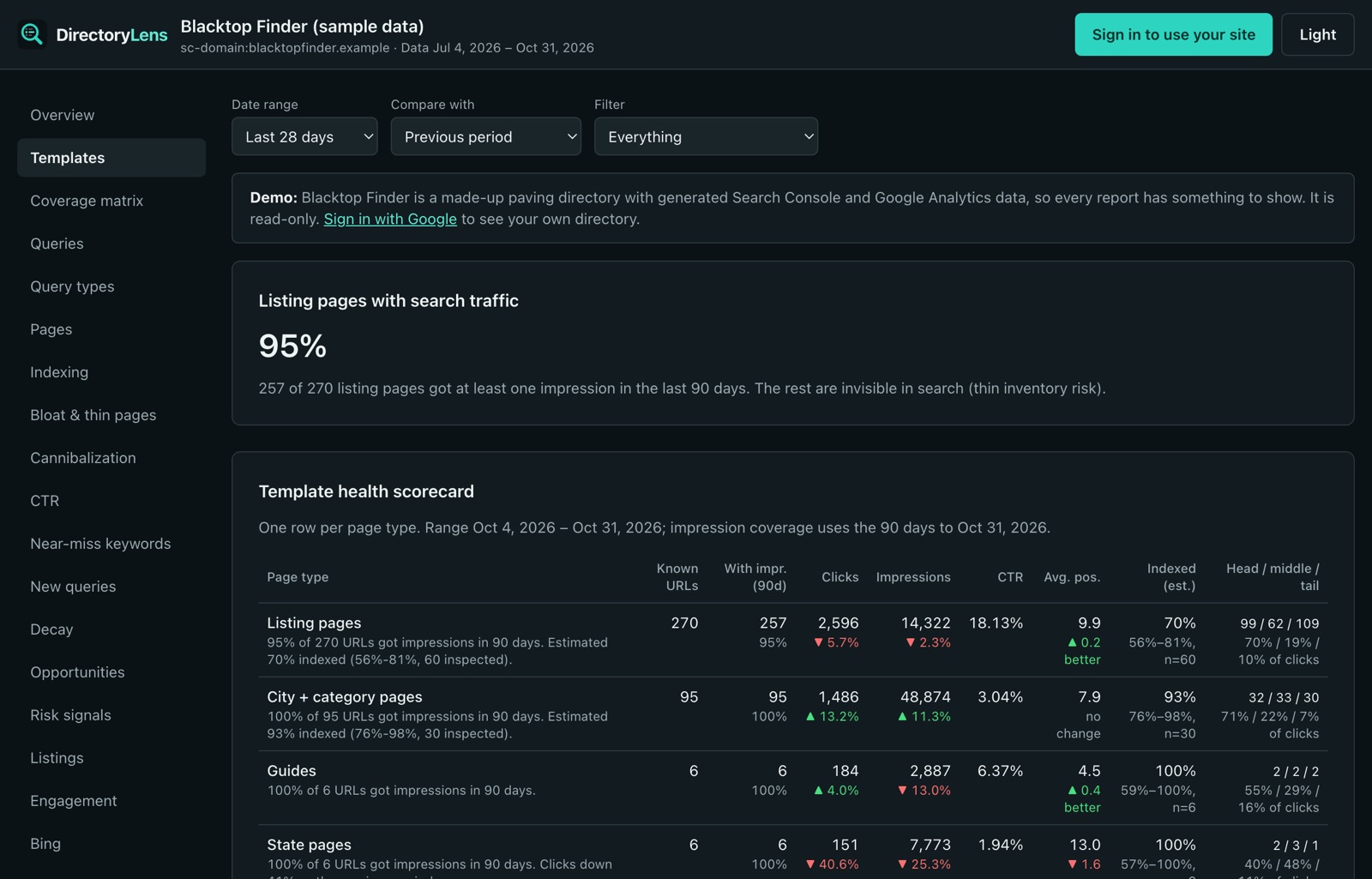
Template scorecard
Clicks, impressions, pages with impressions and estimated index rate for every page type, with change over time.
Coverage matrix
Category × city demand next to the pages that serve it. Export a build list and a prune list.
Near-miss keywords
Searches where you rank 5–20, with a live check of which words your title and description leave out.
New searches
Queries that showed up for the first time this week, and an alert when new demand spikes.
Opportunities
One ranked list of page fixes and new pages, scored by the clicks they could add.
Category and city rollups
Views and contact clicks per category and city, with each top listing's share. Price featured slots on real numbers.
Protect traffic
Hear about problems before they cost you a month.
Indexing, decay and quality checks run every day and tell you in plain words what changed, where, and since when. No black box and no scare words: every score shows the threshold behind it.
Indexing alerts
Priority pages stuck in "crawled, not indexed", templates where unindexed pages grow faster than indexed ones, and sitemaps that suddenly shrink.
Decay by template
Pages, page types, states and categories losing clicks, with the day each drop started.
Recovery scorecard
After a Google update or a cleanup, early signals against your baseline, with Google's own data glitches marked.
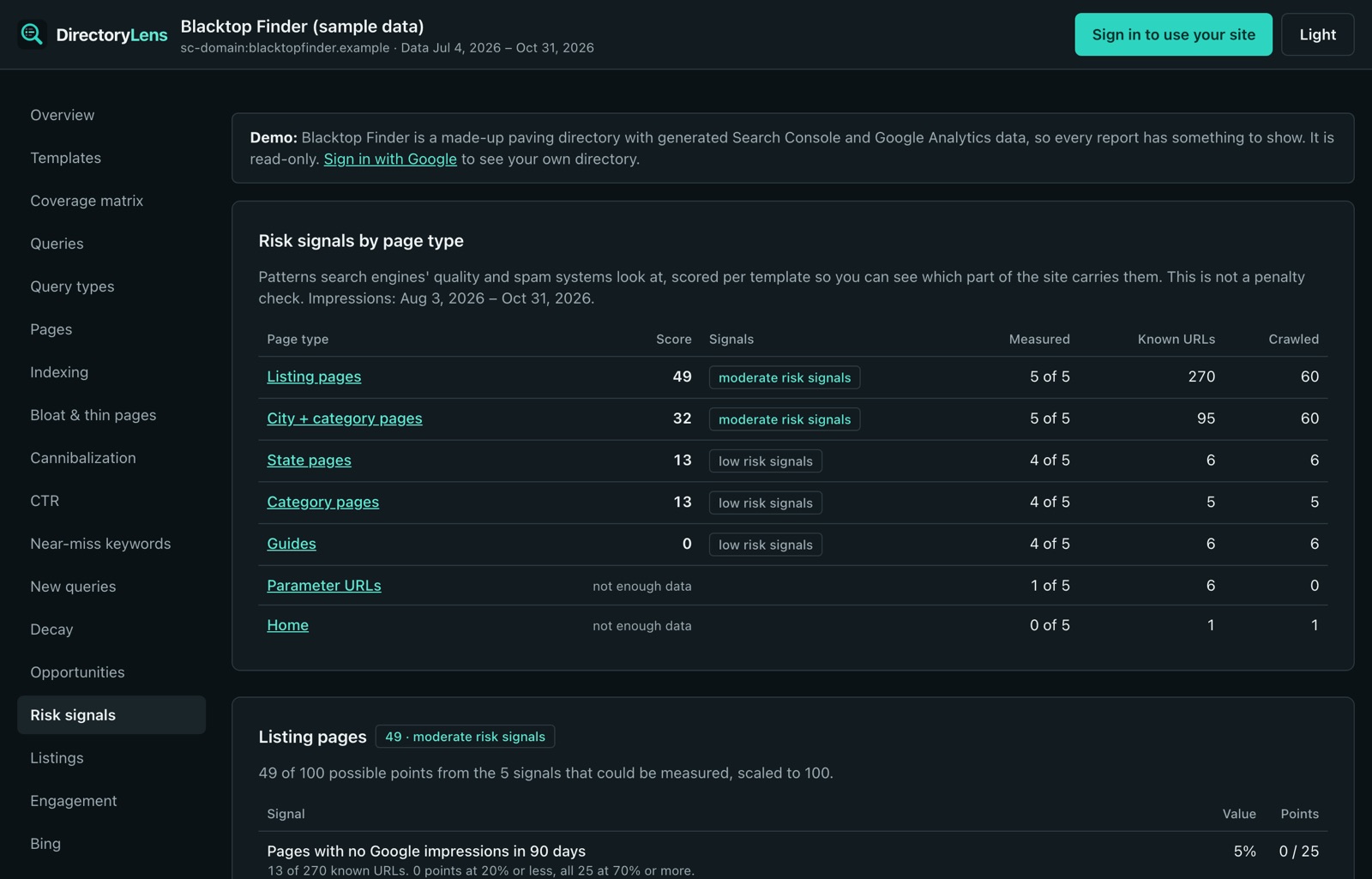
Risk signals
Thin pages, near-duplicate text and pages Google never shows, scored per page type.
URL changes
After a redesign or migration, every old URL checked for broken links, redirect chains and pages that lost their traffic.
Alerts where you work
A weekly digest by email, plus instant alerts to Slack or any webhook.
Prove listing value
Show every business what you send them.
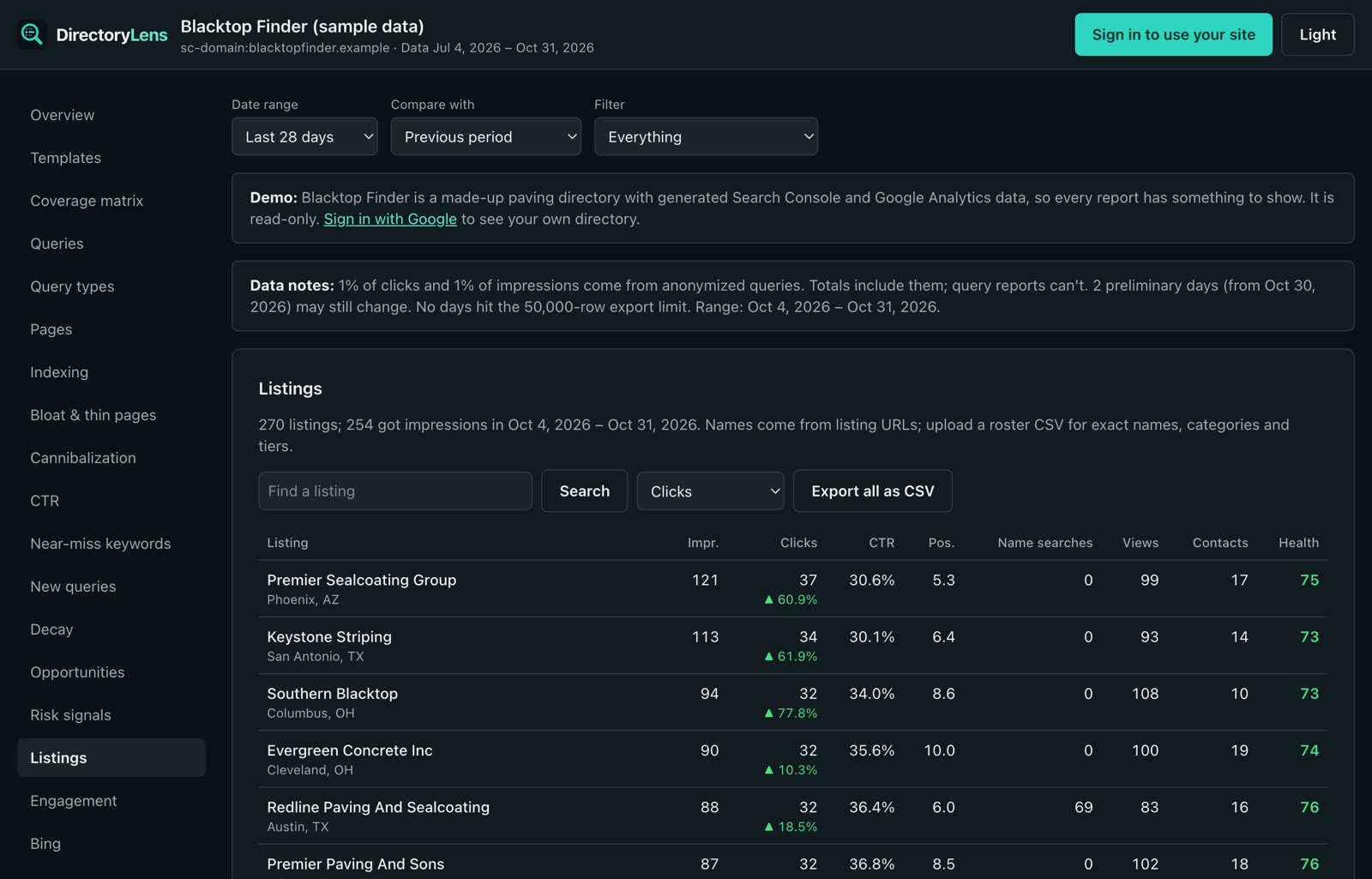
Searches, visits, calls, website and direction clicks for every listing, with a health score. Give paying businesses a reason to renew and free listings a reason to upgrade.
Monthly owner emails
Each business gets its own report every month, with your branding, a link to the full report and a one-click unsubscribe.
Branded share links and PDFs
Send one listing's report as a link or PDF with your logo and colors.
Stat packs for outreach
Pick unclaimed or free listings, make report links for all of them at once and download a CSV for your sales emails.
Stats on your own site
Signed embeds, badges and a JSON feed put each listing's numbers inside your owner dashboard. No new logins to build.
Public stats page
A live, verified media kit for your advertise page: clicks, impressions and visits straight from Google.
From search to phone call
One line of tracking code adds calls, WhatsApp, website clicks, on-site searches and listing-card views to Google Analytics.
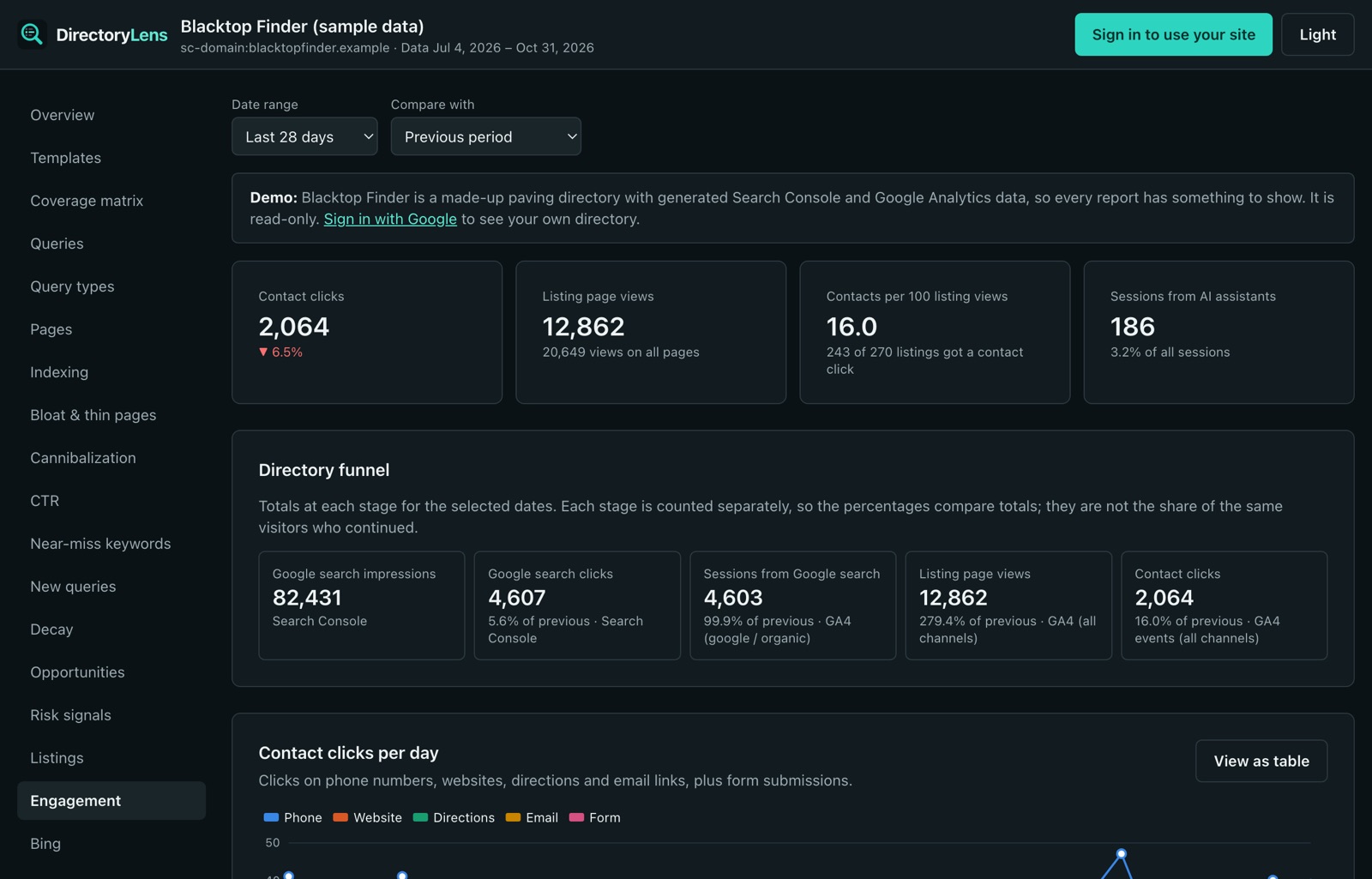
Beyond Google
Bing, AI assistants and your own visitors, in one place.
Bing Webmaster Tools data next to Google's. Visitors arriving from ChatGPT, Perplexity and Copilot. What people type into your own search box, including the searches that found nothing.
Built for operators and agencies
Works the way you already work.
Ask your AI assistant
Connect DirectoryLens to Claude, ChatGPT or any MCP client and ask "which city pages dropped this month?" in plain English. Read-only, and only your workspace.
Every site on one screen
A portfolio view of clicks, indexed share, contacts and open alerts across every directory in your workspace.
Your team, your clients
Invite teammates as admins, members or viewers. Agency plans remove "via DirectoryLens" from every report.
History that doesn't expire
Google keeps 16 months. DirectoryLens imports all of it, then keeps every day, so year-over-year keeps working.
Exports everywhere
CSV for every table, PDF for every report, and a JSON feed for your own dashboards.
Read-only by design
DirectoryLens never changes your site, your Search Console or your Analytics settings. Your data is never sold.
Built by directory operators
Created by AuthorityWorX.
AuthorityWorX is an SEO company that builds and runs its own directory websites. DirectoryLens runs every day on those directories' Search Console and Google Analytics data, so every report has to hold up on a real directory first.
Up and running in minutes.
1
Sign in and connect
Sign in with Google or GitHub, then give read-only access to Search Console. Add Google Analytics and Bing whenever you like.
2
Pick your directory
DirectoryLens imports 16 months of history and proposes your page types, cities and categories from your URLs.
3
Work the reports
Recent days appear first and the rest fills in while you explore. Data syncs and alerts run every day after that.
Simple pricing. Every plan has every report.
Plans differ by sites, listing pages and team size. Pay every 6 months and get one month free, or pay yearly and get two months free.
Founding price · locked for life
Starter
For one directory.
$21.99/month$29.99
Locked in for life
50 founding spots left
- 1 directory site
- Up to 5,000 listing pages
- 2 team members
- Every report, Google Analytics and Bing
- Listing reports, owner emails and embeds
Growth
For directories that sell listings.
$79/month
Billed monthly
- 3 directory sites
- Up to 50,000 listing pages
- 5 team members
- Everything in Starter
Agency
For agencies and directory networks.
$199/month
Billed monthly
- 10 directory sites
- Up to 250,000 listing pages
- 15 team members
- White-label: no "via DirectoryLens"
The founding Starter price is for the first 50 workspaces and stays yours for as long as you keep your subscription, on any billing term. Billed through Stripe; change plans or cancel any time. Compare plans in detail.
How DirectoryLens uses your Google data
- Sign-in uses your Google name and email address to create your account.
- Connecting Search Console grants read-only access (
webmasters.readonly). DirectoryLens reads your properties and their search data. It never changes your site or your Search Console settings. - Connecting Google Analytics is optional and also read-only (
analytics.readonly). - Your data is shown only to people in your workspace. It is not sold or used for advertising.
About the "Google hasn't verified this app" screen
While Google finishes reviewing DirectoryLens, it may show a warning that it hasn't verified the app when you sign in with Google, connect your Google account or add Google Analytics. That's expected: Google reviews every app that can read Analytics data, and DirectoryLens's review was submitted on 6 November 2026 and is in progress. Signing in with GitHub doesn't involve Google.
- It's a Google permission page, not a download. Nothing is installed on your computer.
- Access is read-only: DirectoryLens can't change your site, your Search Console or your Analytics.
- To continue, click Advanced, then the link that starts with "Go to", then Allow. You can remove access any time in your Google account.
Details are in the privacy policy.
Turn traffic into your biggest directory asset.
See your directory the way Google sees it. Connect Search Console in about two minutes, or click through the free demo first; no sign-in needed for the demo.