Updated
GeoDirectory turns WordPress into a directory: a custom post type for listings, categories, and with the Location Manager add-on a page for every country, region and city. That can be thousands of URLs. This guide covers which of them Google sees, how to connect Search Console and Google Analytics on a GeoDirectory site, and how to measure each kind of page separately.
GeoDirectory URLs, page by page
GeoDirectory’s permalink settings decide the listing URL; the Location Manager add-on adds location pages. The defaults:
| Page | Typical URL | Notes |
|---|---|---|
| Listing | /places/place-name/ | Can include location and category, e.g. /places/united-states/texas/dallas/hotels/my-listing/. Set in GeoDirectory » Settings » Permalinks |
| Category + location | /places/category/beaches/united-kingdom/cornwall/ | Version 2 puts the category first; version 1 put the location first |
| Location | /places/united-states/california/san-francisco/ | Needs the Location Manager add-on; some setups use /location/... |
| Near me | /location/near/me/lat,lon/ | A new URL for every pair of coordinates |
| Search | /?geodir_search=1&stype=gd_place&s=...&snear=... | Parameters only; GeoDirectory support says these can’t be made into clean URLs |
Sources: GeoDirectory permalink settings, Location Manager and support threads on search URLs and version 2 permalinks.
The search and near-me URLs are the risk: every search and every set of coordinates is a new address, and they make an endless supply for Google to crawl. Owners on GeoDirectory’s forum have reported thousands of pages excluded by noindex, and 404s after changing permalinks. Both show up in your data long before they show up in traffic.
Connect Search Console, Analytics and your sitemap
- Verify in Search Console. GeoDirectory has no verification field of its own. Use Google’s Site Kit plugin, or the verification field in Yoast (Settings » Site connections) or Rank Math. A Domain property (DNS) covers every version of the site at once.
- Add Google Analytics 4 through Site Kit or your existing tag. GeoDirectory’s free Google Analytics add-on can show basic GA4 numbers on each listing page, but it still needs GA4 on the site.
- Submit the sitemap. Sitemaps come from Yoast, Rank Math or WordPress itself. Check that it includes location pages: Location Manager has an “Exclude location pages in xml sitemap” setting, and Rank Math users have reported location pages missing from the sitemap.
- Connect DirectoryLens. Sign in with Google and pick the property. It imports the 16 months Google keeps and syncs daily, read-only.
Page types for a GeoDirectory site
Every DirectoryLens report is split by page type, so the first job is telling it which URLs are listings, which are category + location pages and so on. Propose from URLs in the site settings groups your known URLs by shape: it recognises US state names and city slugs after them, pagination, and URLs with parameters, which get their own “Parameter URLs” group. For a GeoDirectory site the rules usually end up like this:
Category + location ^/places/category/(?<category>[^/]+)/(?<region>[^/]+)/(?<city>[^/]+)/?$
Location            ^/places/(?<region>[^/]+)/(?<state>[^/]+)/(?<city>[^/]+)/?$
Listing             ^/places/[^/]+/?$
Search              geodir_search=
Near me             ^/location/near/
Rules are tried in order, so the specific ones go first. If your directory is outside the US, write the location rules yourself: the proposal recognises US state names, and region or country names elsewhere look like any other word to it. The preview shows how many URLs each rule catches before you save.
What to watch on a GeoDirectory site
- Search and near-me URLs in Google. Give them their own page types. Impressions or indexed URLs there mean Google is spending time on pages that should not rank; noindex them or block the parameters.
- Location pages for places with no listings. Location Manager can create a page for every city you add. The quality signals report shows, per page type, how many URLs had no impressions in 90 days and how many are thin or near-duplicates.
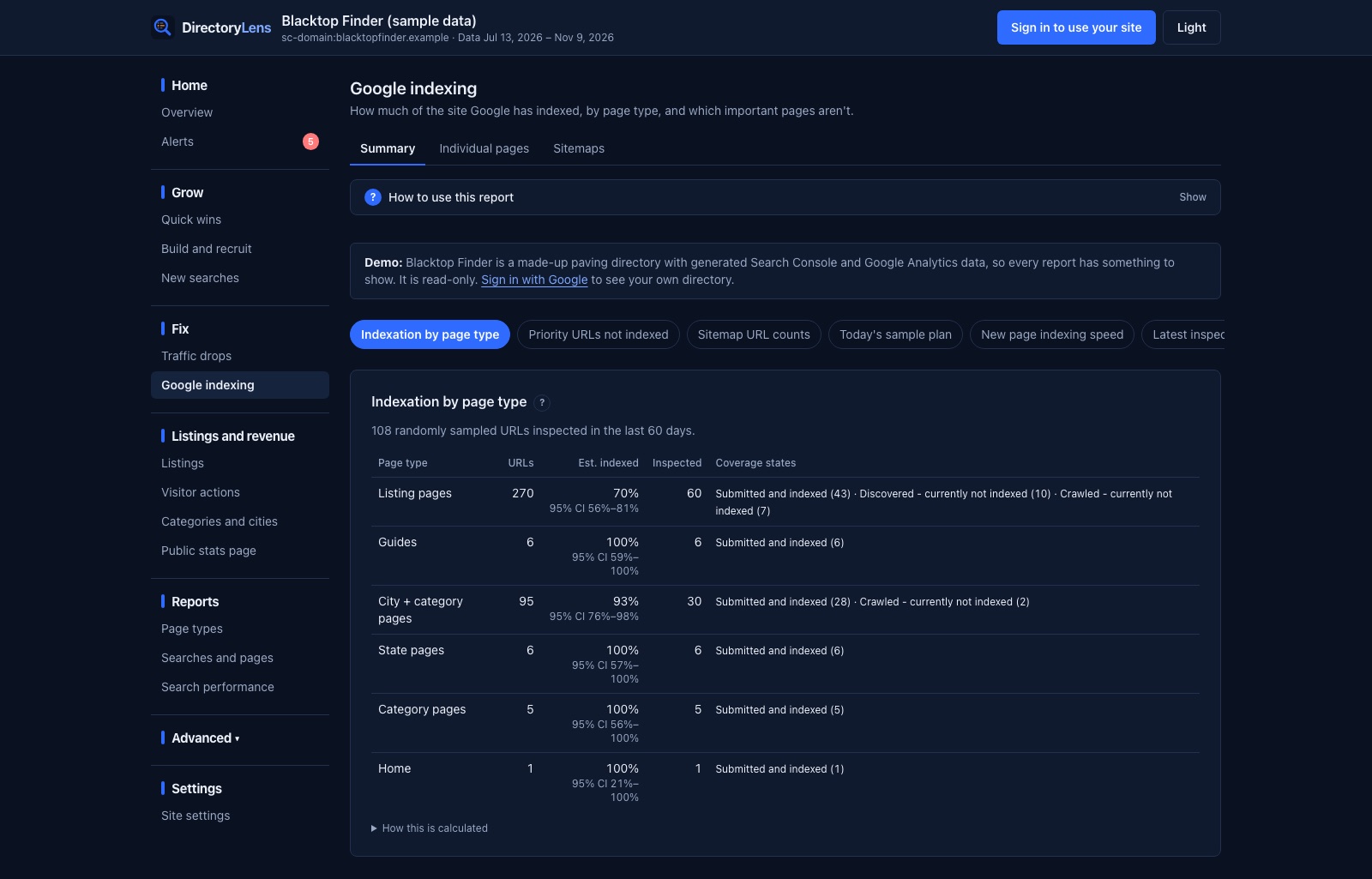
- Listings that are crawled but not indexed. DirectoryLens inspects listing URLs with Google’s URL Inspection API, up to 1,800 a day, and gives the indexed share per page type with each excluded URL listed. See crawled, currently not indexed for what to do next.
- Permalink changes. Changing the listing base or the order of location and category changes every URL. Keep the old URL list; the URL changes check confirms each old address redirects to the new one and tracks whether traffic moves across.
- Category + location demand without pages. The coverage matrix shows category × location searches from Search Console, with whether you have a page and how it ranks. Listing gaps shows where people search and you have few listings.
Stats for listing owners
GeoDirectory has no view counter of its own. Its Google Analytics add-on can show listing owners basic GA4 numbers on the listing page, such as visits and top countries. DirectoryLens adds the Google side for each listing: the searches it appears for, times shown, clicks and position, and searches for the business name. It also adds contact clicks from GA4. Owners get it as an expiring share link, a PDF with your branding, or a monthly email.
To count phone, email and directions clicks, add the snippet after your GA4 tag, with a header-code plugin such as WPCode or your theme’s header scripts box:
<script async src="https://directorylens.com/snippet.js"></script>It sends GA4 events through your own Google tag. Nothing goes to DirectoryLens, and there is no WordPress plugin to keep updated.