Updated
Page indexing issues are the reasons Google gives, in Search Console’s Page indexing report, for not indexing a URL. Open Indexing > Pages, read the Why pages aren’t indexed table, and ask one question of each reason: should these URLs be in Google? Most reasons are normal (duplicates, redirects, pages you noindexed on purpose). The ones to fix are important pages sitting under a reason you didn’t intend.
What the Page indexing report shows
The report covers every URL Google knows on your property, whether it found it through a link, a sitemap or a past crawl. The summary page has three parts:
- A chart of indexed and not indexed pages over time. A steady rise in indexed pages as the site grows is what you want to see. Google’s help says a drop in indexed pages without a matching rise in errors can mean pages are now blocked by robots.txt, noindex or a login.
- Why pages aren’t indexed: one row per reason, with the Source (whether the cause is your website or Google’s systems), the Validation state if you asked Google to check a fix, a trend sparkline and the number of pages. Click a row for the example URLs.
- Improve page experience: issues that didn’t stop indexing but limit what Google can do with the page, such as “Indexed, though blocked by robots.txt”.
The filter above the chart narrows the report to All known pages (the default), All submitted pages, Unsubmitted pages only, or one specific sitemap. Filtering by sitemap is the quickest way to see one part of a large site on its own, which is why splitting sitemaps by page type pays off.
Two things the report is not: it is not a per-URL lookup (you can’t search for a URL in it; use the URL Inspection tool for that), and it is not a to-do list. Google’s help even says that a site with fewer than 500 pages probably doesn’t need this report at all, and can check its key pages with a site: search and URL Inspection instead.
Every reason in “Why pages aren’t indexed”
These are the reasons as the report shows them, with what each one means and whether it usually needs work. Google’s help page uses slightly different headings for three of them: “URL blocked by robots.txt”, “URL marked ‘noindex’” and “URL blocked due to other 4xx issue”. They are the same statuses.
| Reason | What it means | Act or ignore |
|---|---|---|
| Server error (5xx) | Your server returned a 500-level error, timed out or was busy when Googlebot asked for the page. | Act if the pages matter. Check host status in the Crawl Stats report and your server logs; repeated 5xx errors make Google crawl less and eventually drop the URLs. |
| Redirect error | A redirect chain too long, a loop, a redirect URL over the maximum length, or a bad or empty URL in the chain. | Act. Point every old URL straight at its final destination in one hop. |
| Blocked by robots.txt | A robots.txt rule stops Google crawling the URL. | Ignore if you blocked it on purpose (site search, account pages). Act if it’s a page you want found. Guide. |
| Excluded by ‘noindex’ tag | Google crawled the page and found a noindex rule in a robots meta tag or an X-Robots-Tag header. | Ignore if intended. Act if it’s a page you want indexed: find where the noindex comes from. Guide. |
| Soft 404 | The page returns 200 (OK) but looks like an error or empty page to Google. | Act. Return a real 404/410, redirect, or give the page real content. Guide. |
| Blocked due to unauthorized request (401) | The page asks for a login, so Googlebot can’t see it. | Ignore for private pages. Act if public pages are behind a login by mistake (often a staging password left on). |
| Not found (404) | The URL returned 404. Google found it through a link or because it existed before. | Ignore for pages you removed with no replacement. Act if you link to them yourself, list them in a sitemap, or they moved (redirect them). Guide. |
| Blocked due to access forbidden (403) | The server refused Googlebot. Googlebot never sends credentials, so this is usually a misconfiguration: a firewall, bot protection or CDN rule. | Act unless the pages are meant to be private. |
| Blocked due to other 4xx issue | Any other 4xx response, for example 400 (bad request). | Act. Open an example in URL Inspection and test the live URL to see the code. |
| Crawled - currently not indexed | Google read the page and chose not to index it for now. | Act when important pages or a growing share of one page type sit here. Usually thin or near-duplicate content. Guide. |
| Discovered - currently not indexed | Google knows the URL but hasn’t crawled it yet, usually to avoid overloading the site. | Act on large sites when key pages wait for weeks. Internal links and URL cleanup fix it. Guide. |
| Alternate page with proper canonical tag | This URL points to another URL as canonical, and Google indexed that one. | Ignore, after a quick check that the canonical points to the right page. Guide. |
| Duplicate without user-selected canonical | Google sees this URL as a duplicate, no canonical was declared, and Google picked another URL. | Act if Google picked the wrong version or the duplicate shouldn’t exist. Guide. |
| Duplicate, Google chose different canonical than user | You declared a canonical, but Google chose a different URL. | Act if Google’s choice is wrong for users. Guide. |
| Page with redirect | The URL redirects elsewhere, so it isn’t indexed; the target may be. | Ignore for old URLs, http and non-www versions. Act if you link to them or list them in a sitemap. Guide. |
| Blocked by page removal tool | Not in Google’s current help list, but some properties still show it: the URL is hidden by a request in the Removals tool. A temporary removal lasts about six months (Removals help). | Ignore if you asked for it. Cancel the request if the page should be back in Google. |
Warnings under “Improve page experience”
| Warning | What it means | Act or ignore |
|---|---|---|
| Indexed, though blocked by robots.txt | Google indexed the URL from links without crawling it. Its result has little or no description. | Act. Unblock it if you want it in Google; if you want it out, remove the block and use noindex. Guide. |
| Page indexed without content | The page is in the index but Google couldn’t read its content, for example because it is cloaked or in a format Google can’t index. It is not a robots.txt block. | Act. Inspect the URL and test it live to see what Google receives. |
Source: Google’s Page indexing report help, which also explains each reason in more detail.
Which page indexing issues to fix first
- Errors on pages you want indexed. Server errors, redirect errors, 401, 403 and other 4xx responses, plus noindex or robots.txt rules on pages that should rank. These are usually one setting or one template away from fixed, and each one hides real pages.
- Spikes. Compare the sparkline next to each reason with the indexed count. A reason that jumped the week indexed pages fell is usually a template change, a plugin update or a new sitemap full of blocked URLs.
- Soft 404s on real pages. If Google thinks your live category or listing pages are error pages, that is a template problem worth fixing.
- Crawled and discovered for important page types. These take longer to move and need content and linking work, not a setting.
- Everything else: alternates, redirects from old URLs, 404s for removed pages and pages you blocked on purpose. Check them once, then leave them.
How “Validate fix” works
Once you’ve fixed every instance of a reason, open that reason in the report and click Validate fix. Google first checks a few pages straight away. If any still has the issue, validation stops there. If not, it recrawls the known affected URLs (only those, not the whole site), and emails you as it goes. Google’s help says validation typically takes up to about two weeks, and sometimes much longer.
| Validation state | What it means |
|---|---|
| Not started | Some instances have never been part of a validation request. |
| Started | Validation is running and no remaining instances have been found yet. |
| Looking good | Every instance checked so far is fixed. |
| Passed | All known instances are gone or the URLs are no longer available. Only reachable if you clicked Validate fix. |
| N/A | Google found the issue fixed everywhere without a validation request. |
| Failed | Enough pages still have the issue. Fix them and start a new validation. |
- Don’t click Validate fix again while one is running. Wait for it to pass or fail.
- You don’t have to validate. Google updates the count whenever it recrawls an affected URL; validation just gets you the email and the per-URL log.
- Don’t validate reasons you chose on purpose, such as URLs you blocked in robots.txt.
- A pro tip from Google: submit a sitemap of only your most important affected URLs and filter the report by it before validating. A smaller set finishes faster. The validation then covers only the URLs in that sitemap.
- A reason disappears from the table 90 days after its last instance was fixed. If it comes back within 90 days, it reopens with its original first-detected date.
The 1,000-row limit, and checking pages at scale
Each reason’s example table is limited to 1,000 rows, and Google says it isn’t guaranteed to show every URL with that reason even when there are fewer. The same goes for the indexed pages list. On a directory with 40,000 listing pages and 9,000 of them crawled but not indexed, you see at most 1,000 of them, with no way to tell which templates they come from.
Ways around it:
- Split your sitemaps by page type (listings, cities, categories, category-in-city) and filter the report by each one. Each filtered view has its own examples, and the counts tell you which template has the problem.
- Add URL-prefix properties for big sections, such as
https://example.com/listing/. Each property has its own Page indexing report. - Use the URL Inspection API. It returns the same verdict as the URL Inspection tool, one URL per call, with a quota of 2,000 calls per site per day and 600 per minute (Google’s usage limits). That is how a bulk index checker built on Google’s own data works.
Which pages a directory should expect to see excluded
A directory always has a long “not indexed” list, because it generates many URLs that shouldn’t rank. What matters is whether each page type sits under the reason you expect. A healthy split looks like this:
| Page type | Typical reason | Normal? |
|---|---|---|
Site search: /search?q=plumber | Blocked by robots.txt or Excluded by ‘noindex’ tag | Yes, if you chose it |
Sort, filter and map views: /plumbers/austin-tx?sort=rating | Alternate page with proper canonical tag, or Blocked by robots.txt | Yes |
Account, claim and review forms: /claim-listing | Excluded by ‘noindex’ tag, Blocked by robots.txt or 401 | Yes |
| Old slugs, http and non-www versions | Page with redirect | Yes |
| Removed listings with no replacement | Not found (404) | Yes |
Paginated lists: /plumbers/austin-tx?page=4 | Often crawled or discovered but not indexed | Usually; keep them crawlable so listings get found. See pagination. |
| Empty category-in-city pages | Soft 404 or Crawled - currently not indexed | No: add listings, noindex, or don’t publish them |
Listing pages: /listing/joes-plumbing | Crawled - currently not indexed, or Discovered | Only for a small share. A growing share is a template problem. |
| City and category hubs | Should be indexed | Any exclusion is worth a look |
Look at the share of each page type, not the site total. Twelve percent of listings not indexed and steady is normal on most directories. Thirty percent and rising, or any city hubs at all, is not. Pages that never earn impressions even when indexed are a separate problem; see index bloat.
Track indexing by page type with DirectoryLens
DirectoryLens has a Google indexing report with three tabs: Summary, Individual pages and Sitemaps. Every day it runs Google’s URL Inspection API on your site, up to 1,800 URLs (Google allows 2,000): first your priority URLs (your own list plus paid and featured listings), then new sitemap URLs, then a sample of every page type. The Summary shows the estimated share of each page type Google has indexed, with a confidence range, and the coverage states Google returned, in Google’s exact wording.
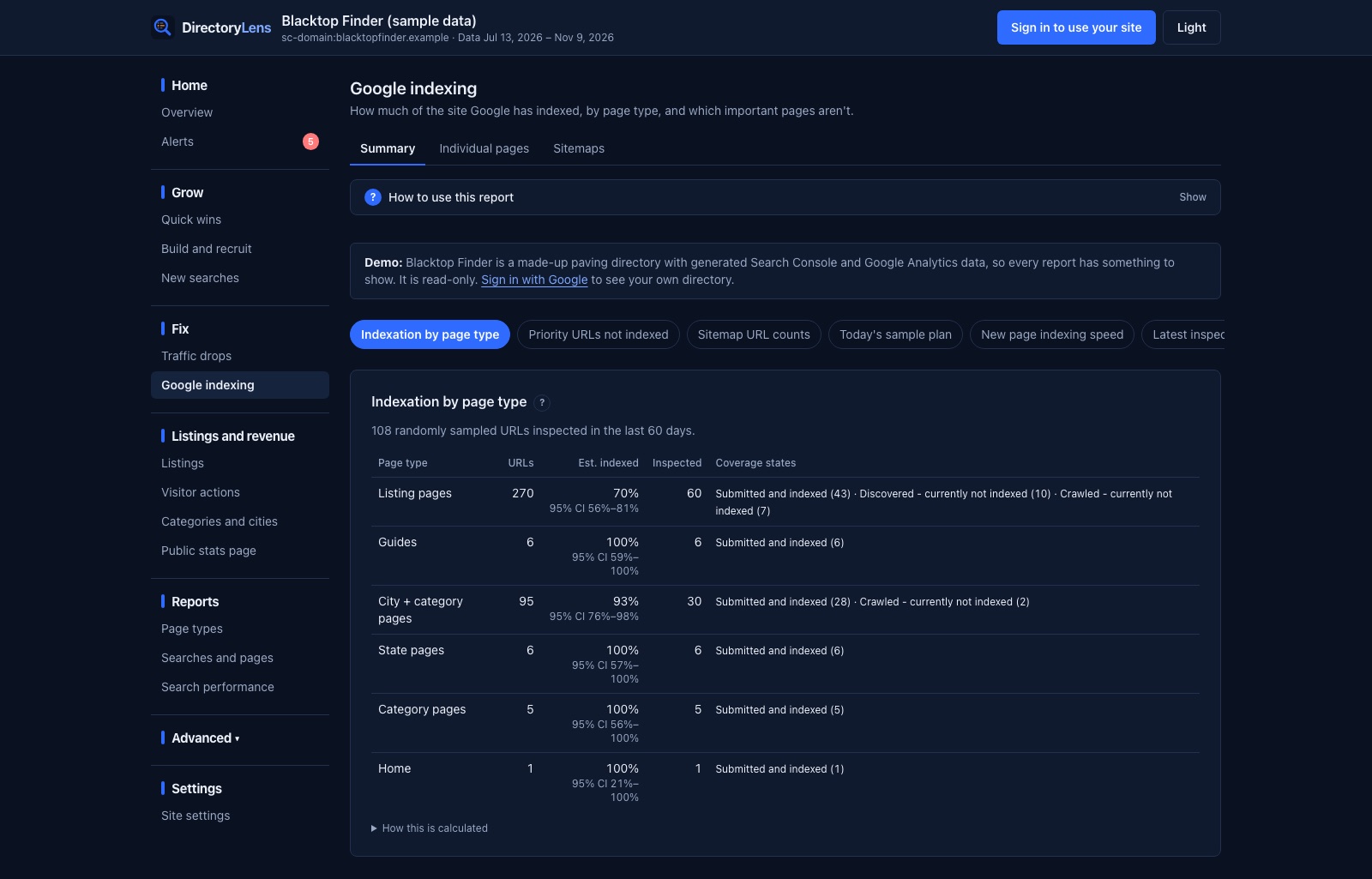
Individual pages lists each inspected URL with its coverage state, last crawl, referring URLs and flags such as Google picked another canonical, Weak internal links and Not in a sitemap. Click any URL for its history, with Google’s canonical next to yours. You can run inspections on a whole page type, a sitemap or a pasted list, and the request indexing queue ranks the crawled, discovered and unknown URLs worth asking Google for first. Alerts fire when priority URLs stay crawled or discovered but not indexed for 14 days (you set the threshold), when crawled-not-indexed grows faster than indexed for a page type, and when a sitemap’s URL count drops sharply.
Two honest limits: DirectoryLens reads indexing through Google’s API and can’t request indexing for you (you click Request indexing in Search Console), and the Summary groups the less common reasons as “Other not indexed”, while each URL row still shows Google’s exact status.