Updated
The URL Inspection tool in Google Search Console shows what Google knows about one URL on your site: whether it’s indexed, when Googlebot last crawled it, how Google found it, which canonical URL Google chose, and whether anything blocks indexing. Paste a full URL into the search bar at the top of Search Console to see the indexed version, use Test live URL to check the page as it is now, and click Request indexing after you’ve changed it.
How to open it
- In Search Console, pick the property, then paste the full URL (with https://) into the Inspect any URL bar at the top and press Enter. You can also click a URL in most reports and choose Inspect URL.
- The URL must belong to the property you are in. For a URL-prefix property such as
https://www.example.com/, anhttp://or non-www URL belongs to a different property. A Domain property covers every subdomain and protocol. - The first screen is the indexed result: what Google stored from its last crawl. Expand Page indexing for the details.
What the verdicts mean
| Verdict | What it means |
|---|---|
| URL is on Google | The page is indexed and eligible to appear in search results. Eligible, not guaranteed: it still has to rank. |
| URL is on Google, but has issues | Indexed, but an enhancement such as structured data has problems that may stop it showing with rich results. |
| URL is not on Google | Not indexed. The Page indexing section gives the reason. |
| URL is available to Google (live test) | Google could fetch the page now and found nothing that blocks indexing. It doesn’t mean Google will index it. |
| URL is not available to Google (live test) | A critical issue, such as a noindex, a block or a fetch error, would stop indexing. |
Wording from Google’s URL Inspection tool help.
Every field in the result, explained
| Field | What it tells you | What to look for |
|---|---|---|
| Page indexing (status) | The page’s coverage state, the same reasons as the Page indexing report: “Page is indexed”, “Crawled - currently not indexed”, “URL is unknown to Google” and so on. | The reason links to the fix. See the page indexing issues guide. |
| Discovery: Sitemaps | Sitemaps submitted in the Sitemaps report that list this URL. | “No referring sitemaps detected” on a page you expected in one. Sitemaps found only through robots.txt aren’t listed here. |
| Discovery: Referring page | A page Google possibly used to discover this URL. | Blank or a deep page for an important URL means weak internal links. It can be blank even when links exist. |
| Crawl: Last crawl | When Google last crawled the page, in your local time. Everything else comes from this crawl. | An old date on a page you changed: Google hasn’t seen the change yet. |
| Crawl: Crawled as | The user agent used: Googlebot smartphone or desktop. | Almost always smartphone. Make sure the mobile page has the full content. |
| Crawl: Crawl allowed? | Whether robots.txt allowed the crawl. | “No: blocked by robots.txt” on a page you want indexed. See blocked by robots.txt. |
| Crawl: Page fetch | Whether Google actually got the page from your server. | Failed: Not found (404), Soft 404, Server error (5xx), Redirect error. |
| Indexing: Indexing allowed? | Whether the page blocks indexing, for example with a noindex tag or header. | “No: ‘noindex’ detected”. See excluded by noindex. If robots.txt blocks the crawl this shows Yes, because Google can’t read the noindex. |
| Indexing: User-declared canonical | The canonical URL your page declares, if any. | “None” is fine for a page that isn’t a duplicate. |
| Indexing: Google-selected canonical | The URL Google chose as canonical among similar pages. | A different URL from yours means Google indexes that one instead. See Google chose different canonical. |
| Enhancements | Rich result types Google detected (such as breadcrumbs or products), video indexing and AMP, with errors and warnings. | Errors that stop rich results. Not every rich result type is covered. |
Indexed result vs live test
The default view is the indexed version: what Google saw on its last crawl, which is what search results use. Test live URL fetches the page now with Google’s inspection crawler and tells you whether it could be indexed as it stands. Use the live test after you fix something, before you request indexing.
The live test is narrower than the indexed result. Google lists what it doesn’t check: sitemaps, referring pages, duplicate and canonical selection, manual actions, quality and security issues, content removals and temporary blocks. So a page can pass the live test and still not be indexed, most often because Google judged it a duplicate or not valuable enough (crawled, currently not indexed).
Both views let you open the page as Google saw it (View crawled page or View tested page), with the HTML Google read and the HTTP response. On JavaScript-heavy listing pages, check that the business name, description and reviews are in that HTML.
Request indexing: how it works and its limits
- Inspect the URL and run Test live URL. If the live test says the URL is not available to Google, fix that first; Search Console won’t accept a request for a page it can’t index.
- Click Request indexing. Google runs a quick check and adds the URL to a priority crawl queue.
- Wait. Google says crawling can take a few days to a few weeks, and that requesting the same URL several times won’t get it crawled faster.
There is a daily limit per property. Google doesn’t publish the number; in practice Search Console starts refusing after about 10 to 12 requests a day. For more than a handful of URLs Google recommends a sitemap. A request also only helps when something changed: requesting an unchanged page that Google already passed on usually gets the same answer.
Common results and what to do
| You see | It means | Do this |
|---|---|---|
| URL is unknown to Google | No link or sitemap has led Google to the URL yet | Link to it from an indexed page, add it to the sitemap, then request indexing |
| Discovered - currently not indexed | Known, not crawled yet | Improve internal links and cut URL waste |
| Crawled - currently not indexed | Read and passed on | Improve or consolidate the page |
| Page with redirect | The URL redirects elsewhere | Inspect the destination instead. See page with redirect |
| Page fetch: Not found (404) | The server returned 404 | Fix, redirect or leave it |
| Google-selected canonical differs | Google indexes another URL as the main version | Make signals agree: canonical, internal links, sitemap |
| Last crawl: N/A | Never crawled | Same as unknown or discovered: links first |
The URL Inspection API and its limits
Search Console’s URL Inspection API returns the indexed result for a URL in a property you have access to: the verdict, coverage state, robots.txt state, indexing state, page fetch state, last crawl time, crawled-as user agent, both canonicals, the sitemaps that list it and referring URLs, plus rich result and AMP details. It needs only read-only access. It can’t run a live test and it can’t request indexing; those stay in the Search Console interface.
| Limit | Value |
|---|---|
| Per site (property), per day | 2,000 inspections |
| Per site, per minute | 600 inspections |
| Per Google Cloud project, per day | 10,000,000 |
| Per Google Cloud project, per minute | 15,000 |
Source: Google’s Search Console API usage limits, checked 16 November 2026.
How to inspect thousands of URLs
At 2,000 a day, checking a 40,000-page directory one URL at a time takes 20 days, and the result is out of date before you finish. Three habits make it workable:
- Sample by page type. A random 100 to 300 URLs from each template (listings, city pages, category pages, category-in-city pages) gives a good estimate of how much of each is indexed, and shows which template has a problem.
- Check the pages that matter every day. The home page, top hubs and any paid or featured listings. Everything else on a rolling schedule.
- Inspect new URLs as they appear in your sitemap, so you see how long Google takes to pick them up.
That is what our bulk index checker does, using the API rather than site: searches.
On directory websites
Inspect one URL of each template before you inspect thousands. A listing that is indexed next to one that isn’t tells you most of what you need: compare the Referring page (is the stuck listing linked from its city page?), the Google-selected canonical (has Google folded it into another listing?) and the content in the crawled HTML. Then fix the template and check a sample again a few weeks later.
How DirectoryLens helps
DirectoryLens runs the URL Inspection API for you, within Google’s quota (it uses up to 1,800 of the 2,000 daily inspections per site). Every day it inspects your priority URLs, including paid and featured listings, then new sitemap URLs, then a sample of each page type, and shows the estimated indexed share per page type in Google indexing > Summary.
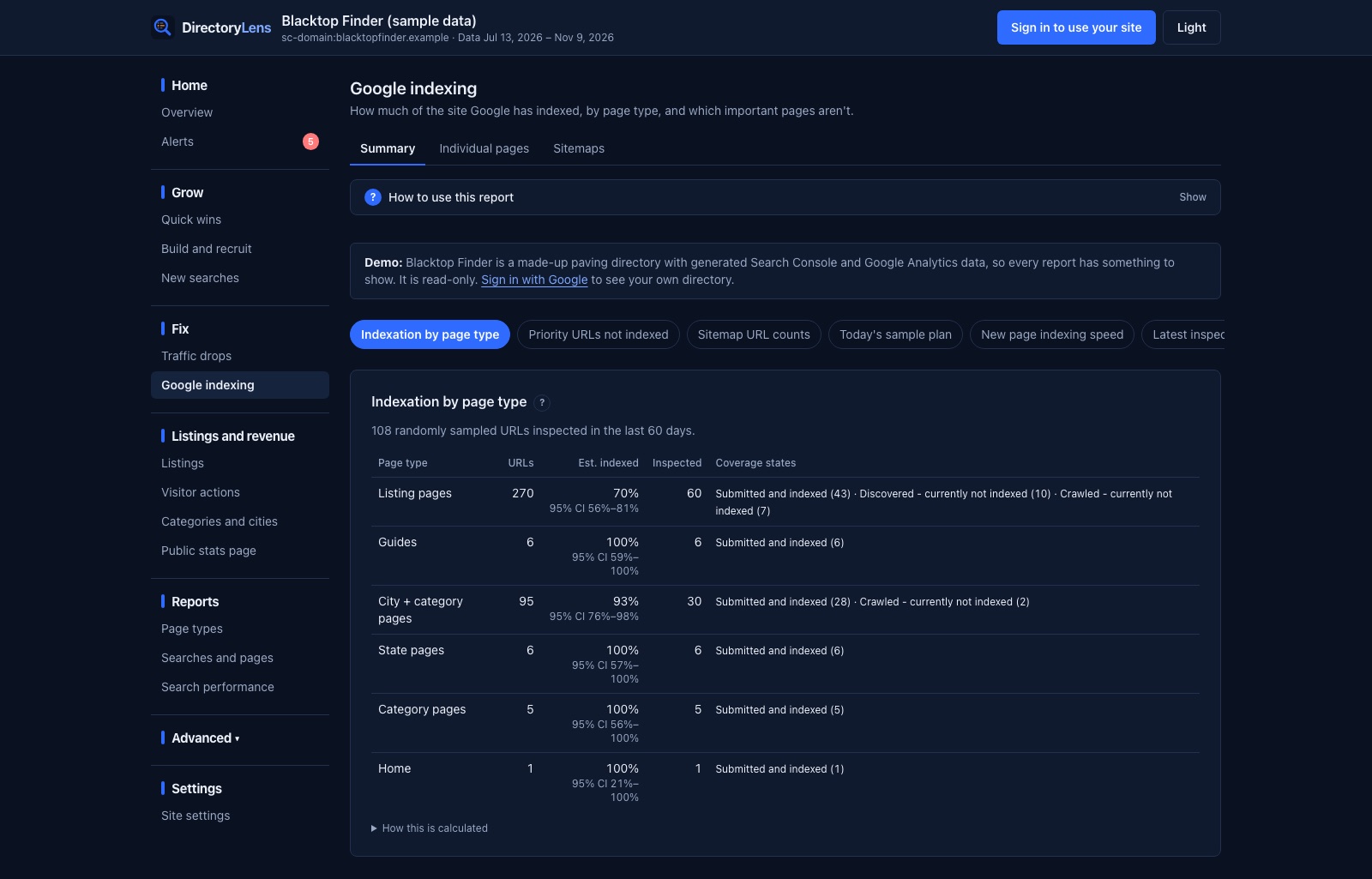
In Individual pages you can start a run on a page type, a pasted list of up to 5,000 URLs, a sitemap, URLs last seen not indexed, or URLs not inspected in a number of days. Each URL keeps its inspection history, and gets flags such as Google picked another canonical, Weak internal links, Not in a sitemap and Not crawled in 60 days. The request indexing queue ranks not-indexed URLs by value and links each straight to Search Console. You can see it on sample data in the live demo.