Updated
A good SEO report for clients answers three questions in plain numbers: how many people saw them in Google, how many clicked, and what those visitors did, compared with last month. A white label SEO report carries your brand instead of the tool’s. For a directory, the clients are the businesses you list, so the report that keeps them paying is a per-listing one: their searches, visits and calls from your site, sent every month.
What a good SEO report for clients contains
- One-line summary. “Google sent 1,240 visits in October, up 12% from September.” If the client reads nothing else, they read this.
- Visibility: impressions from Search Console, the number of times they were shown in Google.
- Visits: clicks from Search Console, and sessions from Google Analytics if you have it, with the change against last month and the same month last year.
- Outcomes: calls, form fills, bookings, sales. This is what the client is paying for; visits are only the means.
- Top searches: the five to ten searches that brought them visitors, in the client’s own words.
- What you did and what’s next: two or three lines, not a task log.
- Problems, honestly: a drop, an indexing issue, a lost ranking, with the likely reason.
Leave out what the client can’t act on: domain ratings, crawl stats, every keyword position. If a number needs a paragraph to explain, it belongs in your notes, not their report.
SEO report template
| Section | Metric | Source |
|---|---|---|
| Summary | Visits this month and change | Search Console clicks |
| Visibility | Times shown in Google | Search Console impressions |
| Visits | Clicks, sessions, change vs last month and last year | Search Console, Google Analytics |
| Results | Calls, forms, bookings or sales | Google Analytics key events |
| Searches | Top 5 to 10 searches with clicks | Search Console queries |
| Pages | Top landing pages | Search Console pages |
| Work and next steps | 2 or 3 lines | You |
For why the Search Console and Analytics numbers in that table won’t match, see Search Console vs Google Analytics.
White label SEO reports
White label means the report shows your name, logo and colors, and not the tool that made it. Clients get a report that looks like your work, and you don’t advertise your tools. Most agency reporting tools (and Looker Studio, if you build it yourself) do this. What to check: whether the share link and PDF are branded too, whether the client can open it without an account, and whether you can revoke it.
A directory’s clients are its listings
A directory owner sells visibility to businesses: a featured spot, a paid listing, a premium tier. Each of those businesses wants the same thing any SEO client wants: proof it works. But the proof isn’t about their website. It’s about their listing on your site: how often /listing/joes-plumbing was shown in Google, how many people visited it, and how many called or clicked through to their website.
General agency tools aren’t built for that. They report on whole websites, one client at a time. A directory has hundreds or thousands of “clients” on one site, each needing its own numbers, sent without hand work. That is what listing reports do.
Listing reports in DirectoryLens
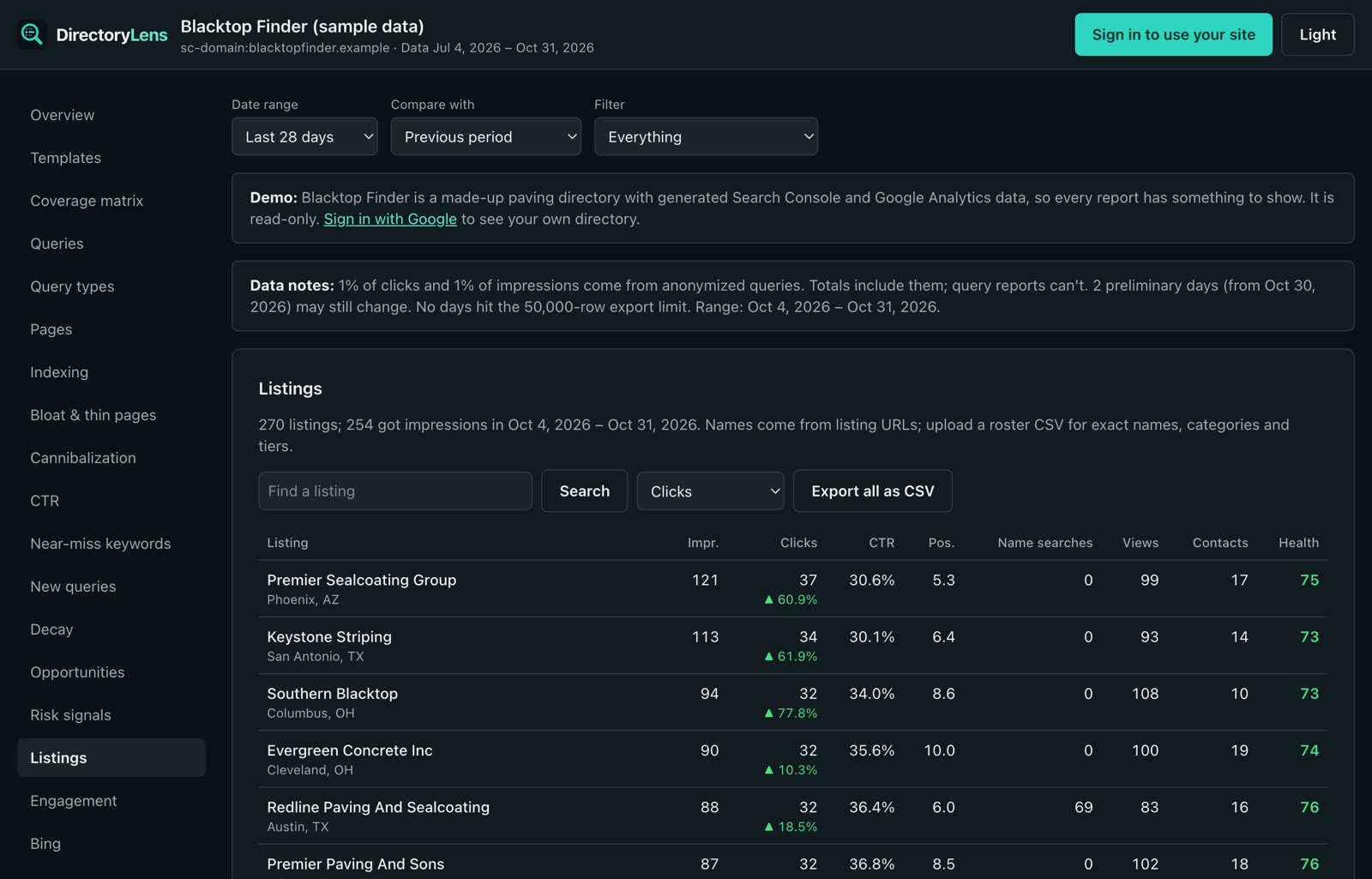
DirectoryLens reads your directory’s Search Console (and Google Analytics, if you link it) and splits the numbers by listing. In Listings and revenue > Listings, each business has a report:
- From Google: times shown, visits, click rate, average position and a daily chart, plus the searches that showed the listing and how often people searched the business’s name.
- From Google Analytics: listing page views and contact clicks (phone, website, directions, email, messaging apps, social, forms). With the optional tracking snippet, also how often the listing was seen in your result lists and searched for on your site.
- Share link: a public page, no sign-in, always showing the latest 30 days. It expires after 90 days and you can revoke it.
- PDF report and daily and searches CSVs for any date range.
- Privacy: search terms that may name other businesses are hidden in shared reports and PDFs, so one client never sees another’s name.
Monthly emails to listing owners
Turn on Monthly emails to listing owners in Site settings and, on the day you choose (the 3rd to the 28th), each business with an owner email gets last month’s numbers for its listing: times shown in Google and visits with the change from the month before, page views and contact clicks when Google Analytics is linked, its top searches, and a link to its live report. You set the sender name, reply-to address, intro text and mailing address; upload owner emails from a CSV; and choose to skip listings with nothing to report. Unsubscribes and bounces are honored automatically. It is off until you turn it on.
Your branding
In Site settings > Branding, add your directory’s name, logo, website and color. They appear on share links, PDFs and monthly emails on every plan. On the Agency plan you can also remove the small “via DirectoryLens” line, for a fully white-label report.
Reports for many listings at once
Stat packs create share links for a whole tier (for example every free listing) in one go, with a CSV for your outreach emails. Listing embeds put a listing’s numbers on the listing page of your own site. And the Upgrades and renewals cards list free listings already getting contacts (with a ready pitch in their own numbers) and paid listings with a reason not to renew, so you send the report before they ask.
Reports that keep listings renewing
- Send before renewal, not after. A business that sees its numbers a month before the invoice renews more often than one that sees them never.
- Lead with contacts. “14 people called you from our site” beats “your listing was shown 2,300 times”.
- Fix the listings with bad news first. A paid listing that isn’t indexed, or gets views but no contacts, needs a better description, photos or category before its report goes out.
- Use free listings’ numbers to sell upgrades. A free listing already getting calls is your easiest featured-spot sale; its own numbers are the pitch.
- Keep it the same every month. Same day, same layout, same numbers, so the business learns to read it.
A public stats page for advertisers
Advertisers and buyers ask a different question: how big is the directory? The Public stats page is a live media kit: a read-only page with numbers straight from Search Console and Google Analytics. You choose what to show (times shown and click rate, pages shown in Google, estimated indexed pages, listing count, page views and visits, top countries, monthly history), the period (28, 30 or 90 days) and how many months of history (6, 12 or 16), preview it, then share a link or embed it on your site. Parts you turn off are left out of the page entirely, and links can be revoked.
Because the numbers come from Google, not from a screenshot you made, they are harder to dispute, which is the point. The Search Console dashboard guide covers the owner-side view of the same data.
What it is not
- Not a general agency reporting tool: no rank tracking for client websites, no Google Ads, social or call tracking integrations. Listing reports are about listings on your directory.
- Listing reports, monthly emails and stat packs are for sites set up as directories. The public stats page works for any site.
- Contact clicks and page views need Google Analytics 4 linked; without it, reports show the Google Search numbers only.
- Anonymized searches can’t be named. A listing with few searches may show visits but no search terms.
To give a teammate or assistant access to the full reports instead, see adding users and the Search Console MCP server.