Updated
Google Search Console vs Google Analytics comes down to before and after the click. Search Console measures how your site appears in Google Search: impressions, clicks, positions and the searches people typed. Google Analytics measures what visitors do once they arrive, from every source: pages viewed, engagement and conversions. Use both, and expect Search Console clicks and Analytics organic sessions never to match exactly.
Search Console vs Google Analytics at a glance
| Google Search Console | Google Analytics 4 | |
|---|---|---|
| Measures | Your appearance in Google Search, before the click | Visitor behavior on your site, after the click |
| Traffic sources | Google Search only (plus Discover and News reports) | Every source: search engines, ads, email, social, referrals, AI assistants |
| Main numbers | Impressions, clicks, CTR, average position | Users, sessions, engagement, events, key events (conversions) |
| Search terms | Yes, except anonymized queries | No, apart from Search Console data you link into it |
| Indexing and technical | Page indexing, URL Inspection, sitemaps, Core Web Vitals | No |
| How it collects data | From Google’s own search logs; nothing to install | A tag on every page, which needs JavaScript and consent |
| Cost | Free | Free (GA4 360 is paid) |
Google’s own guide puts it plainly: Search Console is the source of truth for search performance, Analytics for what happens on the site.
Why Search Console clicks don’t match Analytics sessions
The two closest numbers are Search Console clicks and Analytics sessions from google / organic. Google lists the reasons they differ in its Search Console and Analytics guide. Each one, with how to confirm it:
| Reason | What happens | How to check |
|---|---|---|
| Clicks are not sessions | One visitor who clicks your result three times in two sessions is 3 clicks and 2 sessions. | Expect sessions slightly below clicks on sites with repeat visitors. |
| Missing or broken tag | Pages without the Analytics tag, or where it fails to load, get clicks but no sessions. | Compare the two by landing page; pages with clicks and zero sessions are untagged. |
| Consent and blockers | Visitors who decline cookies or block scripts are not counted in Analytics; Search Console counts them. | Look at your consent rate; a big gap often starts the day a cookie banner went live. |
| Canonical URLs | Search Console reports the canonical URL Google chose; Analytics reports the URL the visitor actually landed on. | Parameter and duplicate URLs show up only in Analytics. |
| Time zones | Search Console uses Pacific Time; Analytics uses the property’s time zone. | Daily numbers shift; weekly and monthly totals line up better. |
| Search types | Search Console splits web, image, video and news, and Discover and News are separate reports. Analytics doesn’t split Google traffic the same way. | Add the search types together before comparing. |
| Non-HTML files | Clicks on PDFs count in Search Console; Analytics can’t tag a PDF. | Filter Search Console pages to .pdf. |
| Bots | Analytics excludes known bots; Search Console may not. | Rarely large, but it adds to small gaps. |
| Attribution | Analytics credits each session to a channel under its attribution rules; Search Console counts every click. | Check whether direct traffic rose when organic sessions fell. |
Small, steady gaps are normal and Google says so. The thing to watch is a change in the gap: if clicks hold steady and sessions fall, something broke on the site (a tag, a consent setting, a redirect), not in Google.
How to compare Search Console and Analytics properly
- Use the same, finished dates. Skip the last three days (Search Console’s newest data is preliminary) and compare whole weeks or months so the time zone difference evens out.
- Filter Analytics to google / organic. In GA4, use session source / medium = google / organic. Google’s own Looker Studio template does the same.
- Use all of Google’s web clicks. In Search Console, the Web search type, and add image and video if they matter for your site.
- Compare by landing page, not just totals. The pages with the biggest gap show where the cause is: an untagged template, a redirect, a duplicate URL.
- Track the ratio over time. Sessions divided by clicks is usually steady for a site. A sudden step means something changed.
For reporting, pick one number per question and stick to it: Search Console clicks for “how much traffic did Google send”, Analytics for “what did those visitors do”. Mixing them in one chart invites questions you can’t answer. See keyword rankings in Search Console for how to read the search side, and content decay for telling a real drop from a measurement change.
Does Search Console only show organic traffic?
Yes. Search Console only reports unpaid Google Search results, plus Discover and Google News in their own reports. Clicks on Google Ads are never included, and neither are visits from Bing, AI assistants, email or social. Clicks on links inside AI Overviews and AI Mode are included, counted as normal web search clicks (Google).
How to link Search Console to Google Analytics 4
Linking adds Search Console data to GA4 so you can see searches next to landing pages. Steps from Google’s help page:
- Check your access: you need the Editor role on the GA4 property and to be a verified owner of the Search Console property. You can verify during the linking if you aren’t yet.
- In GA4, open Admin, and under Product links choose Search Console links, then Link.
- Choose the Search Console property you manage, then Confirm and Next.
- Choose the web data stream for the site, then Next, review and Submit.
- Publish the reports: the Search Console collection is unpublished by default. Open Reports > Library, find the Search Console collection and publish it.
You get two reports: Google organic search queries (searches with Search Console metrics) and Google organic search traffic (landing pages with both Search Console and Analytics metrics).
Limits of Search Console in Google Analytics
- One web data stream links to one Search Console property, and the other way round. A link can’t be edited, only deleted and recreated.
- Search Console metrics only work with Search Console dimensions plus landing page, device and country. You can’t split searches by a GA4 audience or event.
- No time-series charts in those reports, data arrives about 48 hours after Search Console has it, and history stops at Search Console’s 16 months.
Which one to use for what
| Question | Use |
|---|---|
| Did my Google traffic drop, and for which searches? | Search Console |
| Is this page indexed? Why not? | Search Console (URL Inspection, Page indexing) |
| Which search terms bring people to a page? | Search Console |
| Do visitors from Google contact a business or buy? | Google Analytics |
| How much traffic comes from ChatGPT, Perplexity or Copilot? | Google Analytics (referrals) |
| Which pages convert best from organic? | Both: Analytics for conversions, Search Console for the searches |
Can Google Analytics be used for SEO?
Yes, for the half of SEO that happens after the click: engagement on organic landing pages, conversions from organic visitors, and traffic from other search engines and AI assistants. It can’t tell you what people searched, where you rank or whether a page is indexed. That is Search Console’s job, which is why linking them, or reading both in one place, matters.
Traffic from AI assistants
Visits from ChatGPT, Perplexity, Copilot and other assistants never appear in Search Console, because they don’t come from Google Search. Google Analytics sees them as referrals when the assistant passes a referrer or a utm_source tag. Clicks from Google’s own AI Overviews and AI Mode are different: they are counted in Search Console as normal web search clicks. More on that in the AI Overview tracker guide.
The third source: Bing Webmaster Tools
Search Console only covers Google. Bing Webmaster Tools is Bing’s free equivalent, with its own searches, clicks, crawl and index reports, and it is the closest you get to search data for the engines and assistants that draw on Bing. See the Bing indexing guide.
Search Console, Analytics and Bing in one place
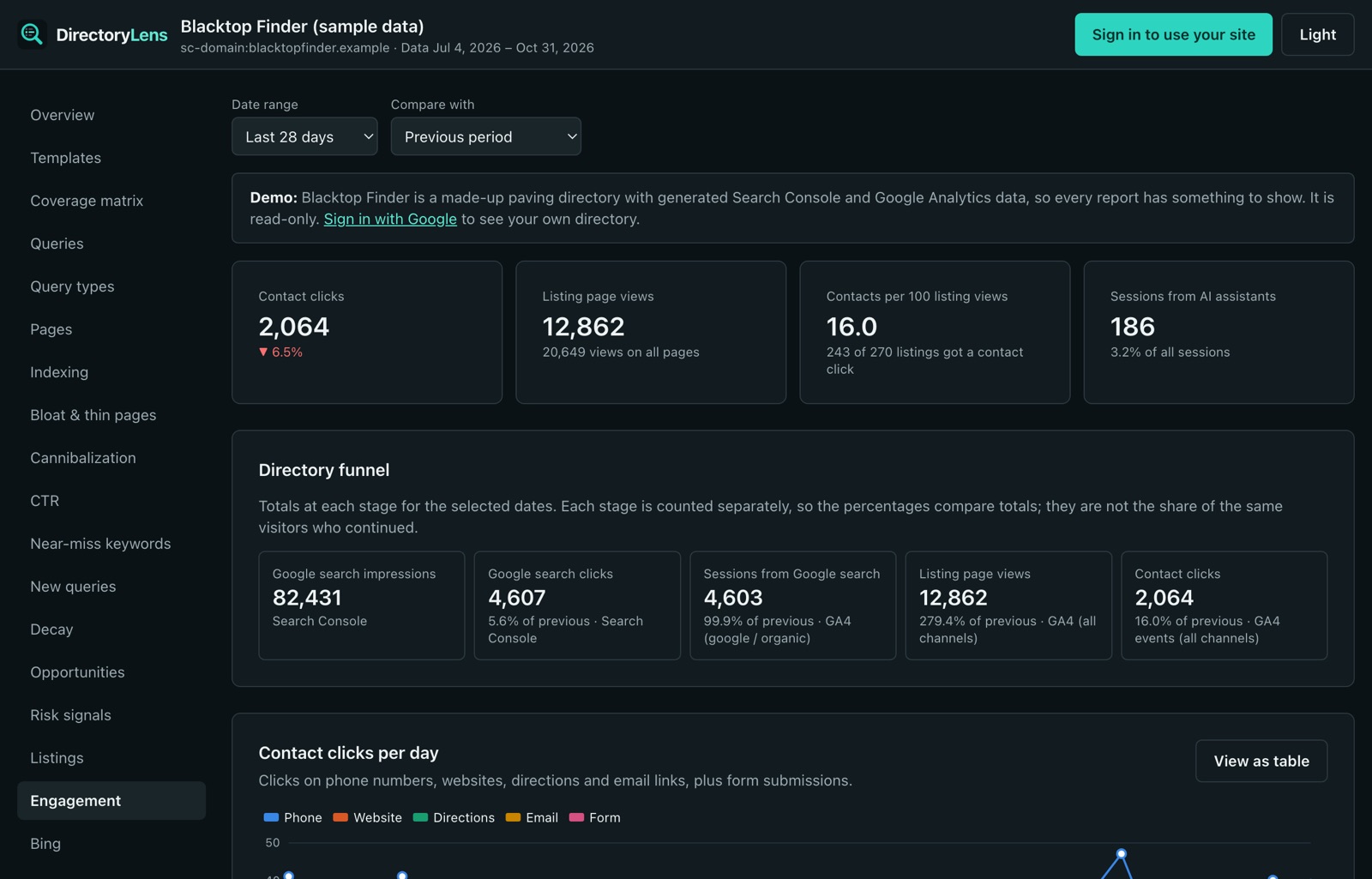
DirectoryLens reads all three, read-only, and shows them side by side. The Visitor actions report puts Search Console clicks next to GA4 google / organic sessions in one funnel, then listing page views and contact clicks (calls, website, directions, email), plus sessions from AI assistants such as ChatGPT, Perplexity, Gemini, Claude and Copilot. The Bing report puts Bing visits next to Google’s for the same days, by page type.
For more on building a combined view, see the Search Console dashboard guide.