Updated
Programmatic SEO is publishing many pages from one template and a dataset, each page targeting a search pattern such as “[category] in [city]” or “[app] + [app] integration”. It works when every page carries data that is unique and useful for that search, and fails, sometimes breaking Google’s scaled content abuse policy, when the template is the only thing on the page.
A directory is programmatic SEO by design: listing, category, city and category × city pages are all templates filled from a database of businesses. This guide covers programmatic SEO from that practitioner’s side: what makes a template worth indexing, where the data comes from, how to link and measure thousands of pages, and how to roll them out without flooding Google with pages it won’t index.
How programmatic SEO works
- A search pattern. A head term plus modifiers: “plumbers in {city}”, “{app} {app} integration”, “{currency} to {currency}”. Many searches share one shape.
- A dataset with one row per page and enough fields to make each page different: businesses, apps, places, prices.
- A template that turns each row into a page answering that search.
- A URL pattern and internal links that let people and Google browse the pages as a hierarchy.
- Measurement by template, because no one can review 20,000 pages one at a time.
Programmatic SEO examples
| Site | Template | What is unique on each page |
|---|---|---|
| Zapier | App integration pages, zapier.com/apps/google-sheets/integrations/trello | The actual workflows the two apps support together |
| Tripadvisor | Restaurant lists such as “Best Italian Restaurants in Sydney” | The restaurants in that place, with their reviews and ratings |
| Nomad List | City pages | Cost of living, internet speed, weather and safety data for that city |
| Yelp | Business pages and category-in-city lists | The business’s details, photos and reviews |
| Any local directory | /plumbers/austin-tx | The plumbers in Austin and what their listings say |
Zapier describes its own app pages, Tripadvisor and Nomad List in its programmatic SEO guide.
The common thread: each page would be useful even if search engines didn’t exist. The template is the delivery mechanism; the data is the product.
A directory is programmatic SEO
| Template | Example | Worth indexing when |
|---|---|---|
| Listing | /listing/joes-plumbing | The business is real and open, with details beyond name, address and phone |
| Category × city | /plumbers/austin-tx | It lists at least your minimum number of businesses located there |
| City | /texas/austin | It links to categories that have listings in that city |
| Category | /plumbers | It helps people pick a place and explains the category |
| State | /texas | It organizes cities that have listings |
| Guides | /guides/hiring-a-plumber | Written for people, not generated |
The category × city template is where directories win most of their search traffic and where they get into trouble: multiply 200 categories by 1,000 cities and you have 200,000 possible pages, most of them empty. The number of pages you publish should come from your listings, not from the multiplication. See doorway pages for the test each page should pass, and location pages SEO for what a city page needs.
What makes a template worth indexing
- Unique data per page. The rows on the page differ from those on its siblings. Ten suburb pages showing the same 12 businesses fail this.
- Enough data to answer the search. One plumber is not a list of plumbers in Austin. Set a minimum row count per template.
- Data that changes the text. Counts, price ranges, ratings and highlights computed from the rows, rather than a paragraph with the keyword swapped.
- A real search behind it, or real browsing value. Pages nobody looks for can stay in the navigation without being indexed.
- Accuracy. Closed businesses, wrong phone numbers and stale prices make the whole template look abandoned. Google’s guidance on generative AI content also asks you to check AI-written text, titles included, before publishing.
Google’s helpful content guidance frames the same test as a question of who the page is for: people, or search engines. Programmatic pages built to catch keyword variants fail it; pages built to present data people want pass it.
Where the data comes from
| Source | Good for | Watch out for |
|---|---|---|
| Your own listings (submitted or claimed) | Listing and category × city pages | Thin profiles; keep a minimum of fields |
| Public data (government licensing lists, Census place names and populations) | Seeding listings, city names, verifying businesses | Others have the same data; add to it |
| Reviews and ratings you collect | Ranking businesses, unique text per page | Must be real reviews of real customers |
| Aggregates you compute | Counts, price ranges, “open late” and similar facts per page | Only meaningful with enough rows |
| Scraped content from other sites | Rarely a good idea | “Scraping feeds, search results, or other content” is an example in Google’s scaled content abuse policy |
Programmatic SEO tools
Programmatic SEO needs three kinds of tool, and no single product does all three well:
- A data store: a database, or a spreadsheet such as Google Sheets or Airtable for smaller sets.
- A page generator: a CMS that builds pages from rows (WordPress with a directory or import plugin, a headless CMS) or a framework such as Next.js. On directory platforms the platform is the generator.
- Measurement by template: Search Console data grouped by page type, indexing per page type, and a way to see which generated pages Google never shows. Search Console itself shows URLs, not templates.
Internal linking for thousands of pages
- A browseable hierarchy: state → city → category in city → listing, with breadcrumbs. Google’s doorway policy calls out pages that are “closer to search results than a clearly defined, browseable hierarchy”.
- Sideways links: nearby cities on city pages, related categories on category pages, nearby businesses on listings. They give deep pages more than one path in.
- No islands. A generated page linked only from the sitemap tends to stay “Discovered - currently not indexed”.
- One sitemap per template, so Search Console’s Page indexing report shows which template is stuck.
Measure by template
A page-type scorecard is the core report for programmatic SEO: one row per template with its known URLs, the share Google showed at least once in 90 days, clicks, impressions, click rate, average position and estimated indexed share, each compared with the previous period. A template whose indexed share falls or whose never-shown share climbs is the first sign of a quality problem, usually weeks before clicks drop.
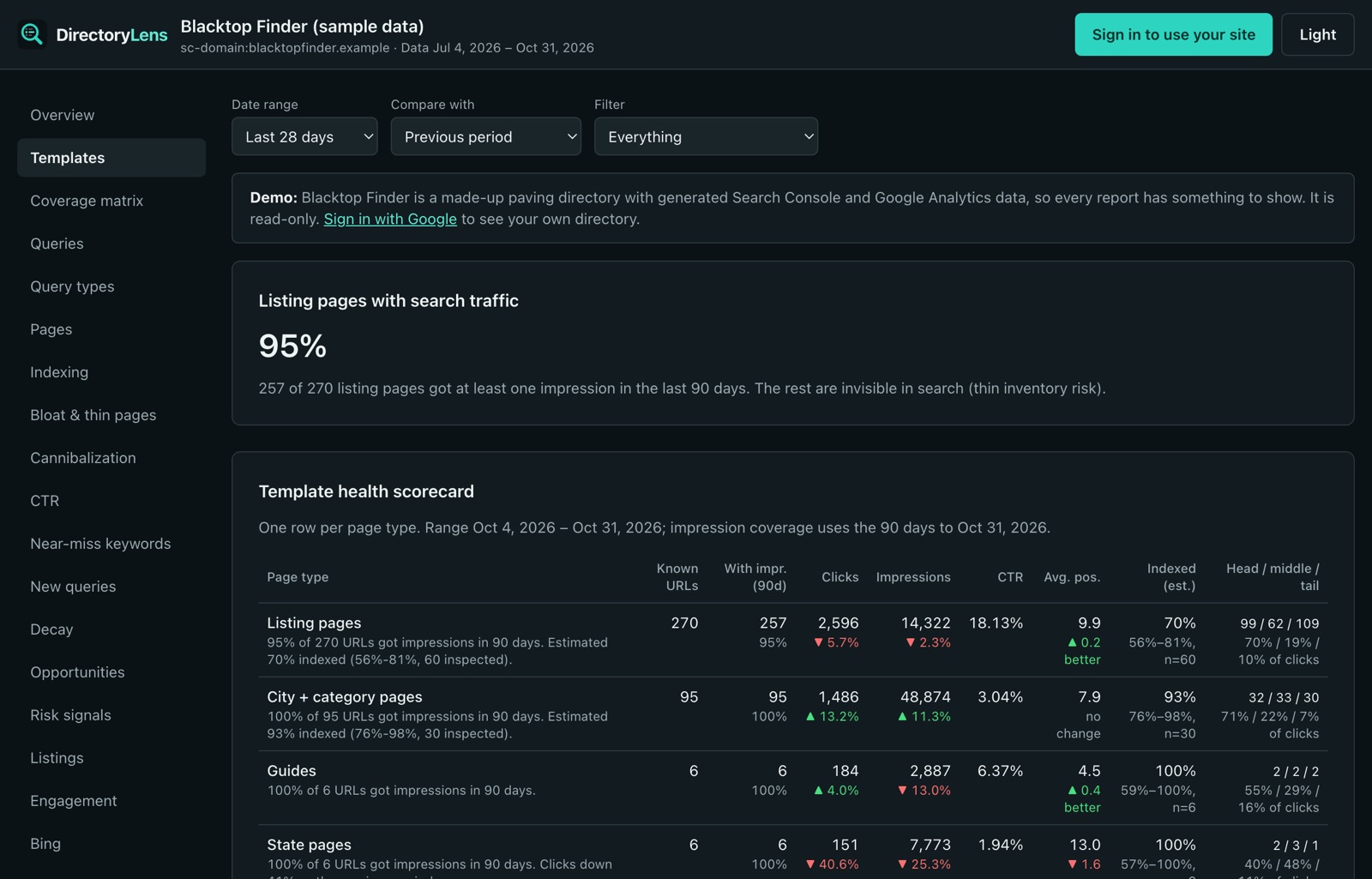
To improve a template, test the change on half of its pages and compare with the other half rather than changing all of them and hoping. See SEO A/B testing.
When to noindex, merge or delete generated pages
| Page | Do this | Why |
|---|---|---|
| Below your minimum, but you are adding data there | Noindex, keep out of the sitemap | It can be indexed once it fills |
| Duplicates a sibling (same rows, variant keyword) | Merge with a 301 into the page you keep | One strong page beats two weak ones |
| No data and no prospect of any | Delete; return 404 or 410 | It will never be useful |
| Real data, never shown, newer than about 4 months | Wait | New pages often take months to earn impressions |
| Real data, Google hasn’t crawled it | Link to it from indexed pages | Zero impressions says nothing about demand yet |
More on cleaning up generated pages in index bloat and zombie pages.
Roll out in batches
- Start with one slice: one state, one category, or the pages with the most data. Publishing every generated page on day one gives Google far more to crawl than a site of your size usually gets.
- Check each batch before it goes live: enough rows per page, no duplicate pages, a real search or browsing reason.
- Watch how fast Google indexes the batch and how many pages it shows at least once. If most of the batch is indexed and shown, publish the next one.
- If it stalls, fix the template before publishing more. Adding pages to a template Google is passing on makes the problem bigger.
How DirectoryLens helps
- Page types: rules group your URLs into templates (it can propose them from your URLs), and the template health scorecard reports each one, including an estimated indexed share from daily URL inspections.
- Check pages before you publish: paste up to 300 planned category and city pages and get a verdict for each: publish, fine but little searched, recruit more listings first, already have one, or listed twice.
- New page indexing speed (Google indexing) shows how many days new sitemap URLs took to get indexed and first shown, which tells you whether a batch is landing.
- Quality signals and Thin and unused pages flag near-duplicate, thin and never-shown pages per template, and Title tests split a template in half to test title changes.
The directory analytics guide covers the rest of what to track. You can see every report on the live demo.