Updated
To build a directory website, pick a niche where people search for a kind of business in a place, collect real listings before you launch, and choose a platform that can give every category and city its own clean page. Plan the URLs and decide which pages Google should index before you build, launch with only the pages that have listings on them, then measure each page type in Search Console and grow where people search and you have no page yet.
Most guides to starting a directory website stop at picking a builder and a theme. The part that decides whether the site gets search traffic is the structure underneath: which pages exist, which ones Google is asked to index, and whether each one has something on it worth showing. That’s what this guide covers, step by step.
What a directory website is
A directory website is a searchable list of businesses, people or resources in one niche, organized by category and usually by place: “plumbers in Austin”, “dog groomers in Denver”, “sealcoating contractors in Texas”. A few page templates repeat thousands of times: a page per listing, a page per category, a page per city, and a page per category in each city. Those category-in-city pages are where most search demand lands, because that is how people search.
Step 1: Pick a niche and check the demand
A niche works for a directory when three things are true: people search for it with a place name, there are enough businesses to list in each place, and the results aren’t already owned by a few strong sites. Check each one before you build anything.
- Search demand. Type “[category] in [city]” and “[category] near me” into Google for five or six cities of different sizes. Keyword tools give monthly volumes; even without one, the autocomplete suggestions and the “People also ask” box show whether people search this way.
- Who ranks now. If page one is all the big general directories and the businesses themselves, a niche site can still win with better pages. If page one is a map pack and nothing else, organic clicks will be fewer. If a niche directory already ranks everywhere, look at what it lacks.
- Supply. Count businesses in Google Maps for the category in a few cities. A city page with two listings is thin, so a niche needs enough businesses per city to fill the pages you plan.
- Someone who pays. A directory earns from the businesses listed (featured spots, memberships, leads) or from visitors (ads). Check that businesses in the niche already pay for leads or advertising.
Step 2: Get your first listings before you launch
A directory with empty pages is the worst version of the idea, for visitors and for Google. Line up listings first, then publish the pages they fill.
- Build a list of real businesses per city. Google Maps, trade associations, licensing boards and local chambers of commerce are the usual sources. Record the category and service area for each one.
- Set a minimum per page. Decide how many listings a category-in-city page needs before it goes live, three for example. Places below the minimum wait until you recruit more.
- Recruit and enrich. Contact businesses to claim and complete their listing: description in their own words, services, hours, service area, photos. A listing with only a name, address and phone looks like every other copy of that data on the web.
- Don’t publish scraped pages at scale. Google’s spam policies list “scraping feeds, search results, or other content to generate many pages” as scaled content abuse. Public data is a starting point for outreach, not the page.
Recruiting never really stops: the cities and categories people search for most will change what you recruit for next. Location pages SEO covers what makes a city page worth indexing.
Step 3: Choose a platform
The platform matters less than people think, with one exception: it has to be able to give each category in each city its own readable URL, title and description. Otherwise the searches that bring directory traffic land on a search results page with parameters, or nowhere.
| Option | What it is | What to check for SEO |
|---|---|---|
| Brilliant Directories | Hosted directory software with member profiles, categories, locations and memberships built in | Category and location pages are search results pages, with readable and parameter URLs. Brilliant Directories guide |
| WordPress + a directory plugin | GeoDirectory, Directorist, HivePress, Business Directory Plugin, or themes such as ListingPro and Listeo | Whether category + location combinations get their own pages, and whether search URLs are kept out of the index. GeoDirectory guide, plugin comparison |
| No-code builders | A site builder’s CMS with a spreadsheet or database as the source (Webflow with Airtable, for example) | CMS item limits on your plan against your listing count, and whether you can generate category-in-city pages without building each by hand |
| Custom build | Your own code and database | Full control of URLs, templates and indexing rules; you also own every mistake |
No ranking claims here: none of these platforms ranks better by itself. What ranks is the pages you build on it.
Step 4: Plan the URL scheme and page types
Decide the URL pattern for every page type before you add the first listing. Changing it later means redirecting every old URL, which is a site migration in all but name. Google’s URL structure guidelines recommend readable words rather than long ID numbers, and hyphens rather than underscores.
| Page type | Example URL | Job |
|---|---|---|
| Category hub | /plumbers | Lists the places you cover for one category |
| City or state hub | /tx/austin | Lists the categories you cover in one place |
| Category in city | /plumbers/austin-tx | The main landing page: the businesses for one search |
| Listing | /listing/joes-plumbing | One business, with everything a customer needs to choose it |
| Guides | /guides/water-heater-costs | Answers to questions people ask before they hire |
| Paginated lists | /plumbers/austin-tx?page=2 | Lets visitors and Google reach every listing on a long list |
| Search and filters | /search?q=emergency&sort=rating | For visitors; usually kept out of the index |
Two choices save trouble later. Keep listing URLs independent of category and city, so a business that changes category or moves doesn’t change its URL. And make one URL the only one for each category-in-city combination: /plumbers/austin-tx and /austin-tx/plumbers both live means two pages competing for one search.
Step 5: Decide which pages to index at launch
A new site has no track record, so Google crawls it carefully. Spend that attention on the pages that deserve it. A simple launch policy:
| Page | At launch | Why |
|---|---|---|
| Category in city with enough listings | Index, list in the sitemap | These are the pages people search for |
| Category in city below your minimum | Don’t publish yet, or noindex | An empty or one-listing page is thin and can read as a doorway page |
| Listings with real content | Index | Business-name searches land here |
| Empty listings (name and phone only) | Noindex until enriched | Near-duplicate of the same data everywhere else |
| Page 2 and later of a list | Crawlable, canonical to itself | So Google can reach every listing. Pagination guide |
| Search results, sorts, filters | Noindex, or block crawling | Endless near-identical lists |
Google’s doorway abuse examples include “pages targeted at specific regions or cities that funnel users to one page”. A category-in-city page with real local businesses on it is a useful page; the same template with no businesses is the thing the policy describes. Doorway pages and scaled content abuse cover where the line sits, and programmatic SEO covers templates at scale.
Split the sitemap by page type (one file for listings, one for category-in-city pages, and so on) so Search Console shows indexing for each type. A single sitemap file holds at most 50,000 URLs or 50MB uncompressed, per Google’s sitemap docs, so a large directory needs a sitemap index anyway. Release new cities in batches rather than all at once.
Step 6: Make each page type worth indexing
Category-in-city pages
The listings themselves come first, ordered by something useful (completeness, reviews, distance), then what’s specific to that place: the neighborhoods served, typical prices if you know them, licensing rules in that state, and links to nearby cities and related categories. A paragraph that only swaps the city name is the near-duplicate text that keeps pages out of the index.
Listing pages
Services, service area, hours, photos, reviews, a description the business wrote, and clear contact options. Link each listing to its category-in-city page and to a few nearby listings, so no listing is reachable only through page 30 of a list.
Guides
A handful of guides that answer what customers ask before they hire (“how much does sealcoating cost”) earn links and searches that list pages can’t. Link from guides to the matching category pages.
Step 7: Choose how it makes money
The common models, which many directories combine:
- Featured placement: a business pays to appear first on a category or category-in-city page.
- Membership tiers: free basic listings, with paid tiers that add photos, a longer description, a website link or lead forms.
- Leads: the directory charges per inquiry or call it sends.
- Advertising and sponsorship: banner or sponsored slots sold by category or city.
Paid links have one rule worth knowing early: Google asks that links which are ads or paid placements carry rel="sponsored" (Google’s link attributes). Set that in the template for paid tiers. Whatever the model, businesses renew when they can see what their listing gets, so plan to measure per listing from day one.
Step 8: Launch and measure by page type
- Verify the site in Search Console as a Domain property, submit the sitemaps, and add Google Analytics 4 with events for phone, website and directions clicks.
- Watch indexing by page type, not in total: what share of listings and category-in-city pages Google has indexed, and which are stuck as crawled, not indexed or discovered, not indexed.
- Give new pages time. A page with no impressions in its first few months often just hasn’t been crawled and ranked yet. Judge templates on months of data, not weeks.
- Find searches with no page. The Queries report shows category-in-city searches where you appear with the wrong page or barely at all. Those are your next pages, or your next recruiting list.
- Prune what never earns. After a few months, pages Google never shows are candidates to improve, merge or noindex. Index bloat and zombie pages covers how to decide.
How DirectoryLens helps once you launch
DirectoryLens works from your Search Console, Google Analytics and Bing data, so it starts being useful once the site is live and verified. It doesn’t build the site.
- Page types: click Propose from URLs and it groups your URLs into listings, category, city, category-in-city, pagination and parameter pages, so every report is split the way the site is built.
- Google indexing: daily URL inspections per page type, with the estimated share indexed and the pages that are stuck.
- Where to build: category and place combinations where people search and you have no page, with “recruit first” where you have too few listings. Check pages before you publish takes a list of planned pages and gives each a verdict before it goes live.
- Recruit (market data add-on): real businesses in a category and city that aren’t on your site yet, from Google Maps business data, tracked in the Recruiting pipeline.
- Listings: each business’s searches, visits and contact clicks, with reports you can share at renewal time.
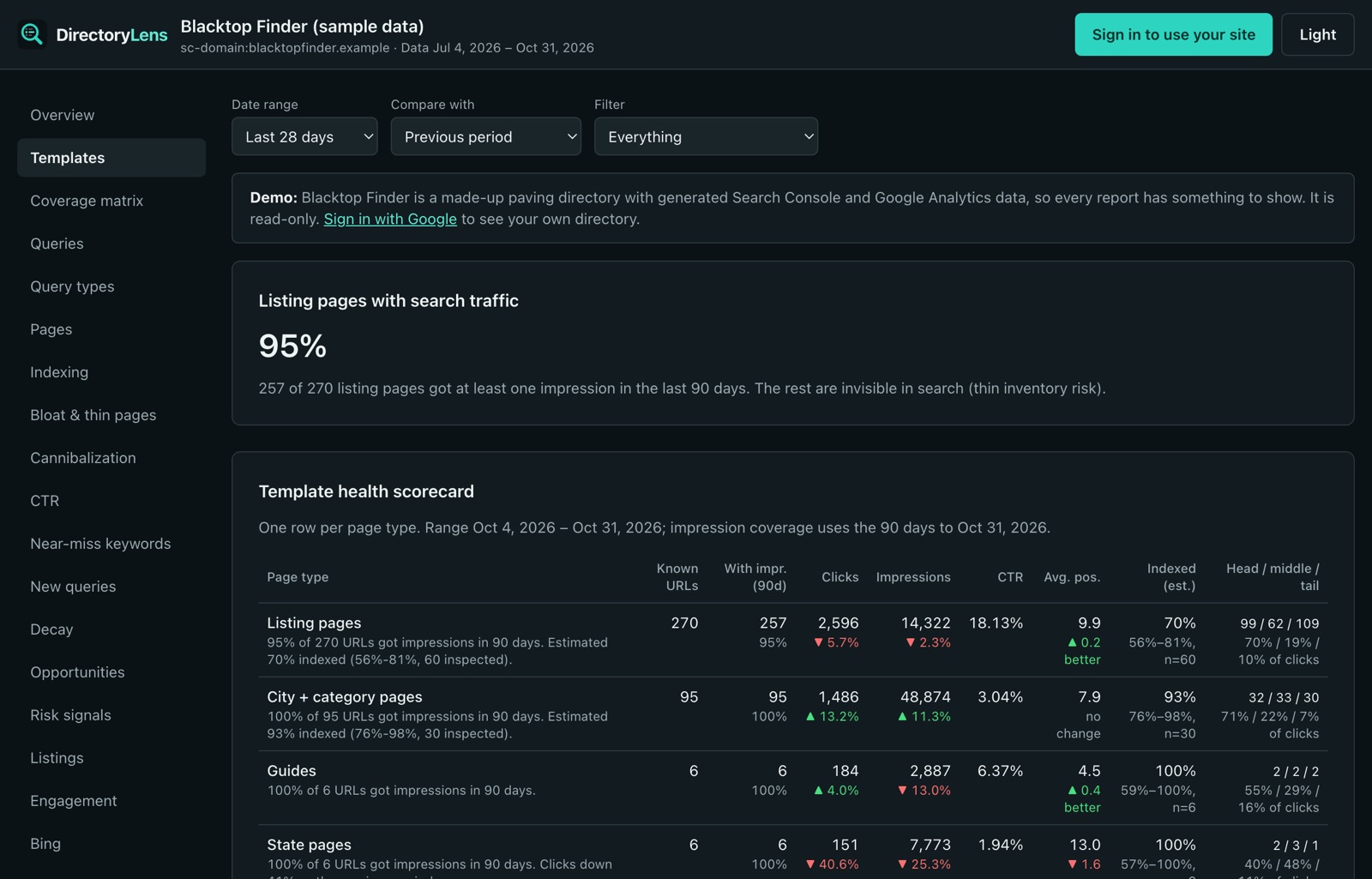
You can see it on a sample directory in the live demo, no sign-in needed.